Email generator
Starting every outreach email from a blank page takes time you do not have during an active job search. Lyrra's email generator builds a first draft from your saved resume data, lets you pick the right email style for the situation, and gives you a clean editor to refine the message before you send it.
Last updated:
Recruiter emails, follow-ups, networking messages, and application outreach are easier to write when you are not starting from a blank page every time. Lyrra's email generator helps you draft job search emails from your saved documents, then edit the subject, recipient, and body before sending.
Start From Saved Resumes and Cover Letters
The email generator is connected to your Lyrra documents. You choose a saved resume or cover letter, and the tool uses available document and profile details such as your name, contact information, recent experience, skills, and company fields where present. That gives you a stronger first draft than a generic template that knows nothing about you.
This connection between your documents and your outreach is what separates Lyrra's email generator from a standard email template tool. The starting point is your actual experience and context, not placeholder text you need to rewrite entirely.
The email generator now also understands more of the outreach context before you enhance a draft. You can start with no context, select a saved resume or cover letter, connect a tracker job, choose the email purpose, and set the recipient type, such as recruiter, hiring manager, founder, alumni, referrer, or HR. That means a follow-up to a recruiter can stay short and direct, while a message to a founder or referral contact can use a more personal structure without requiring a separate tool.
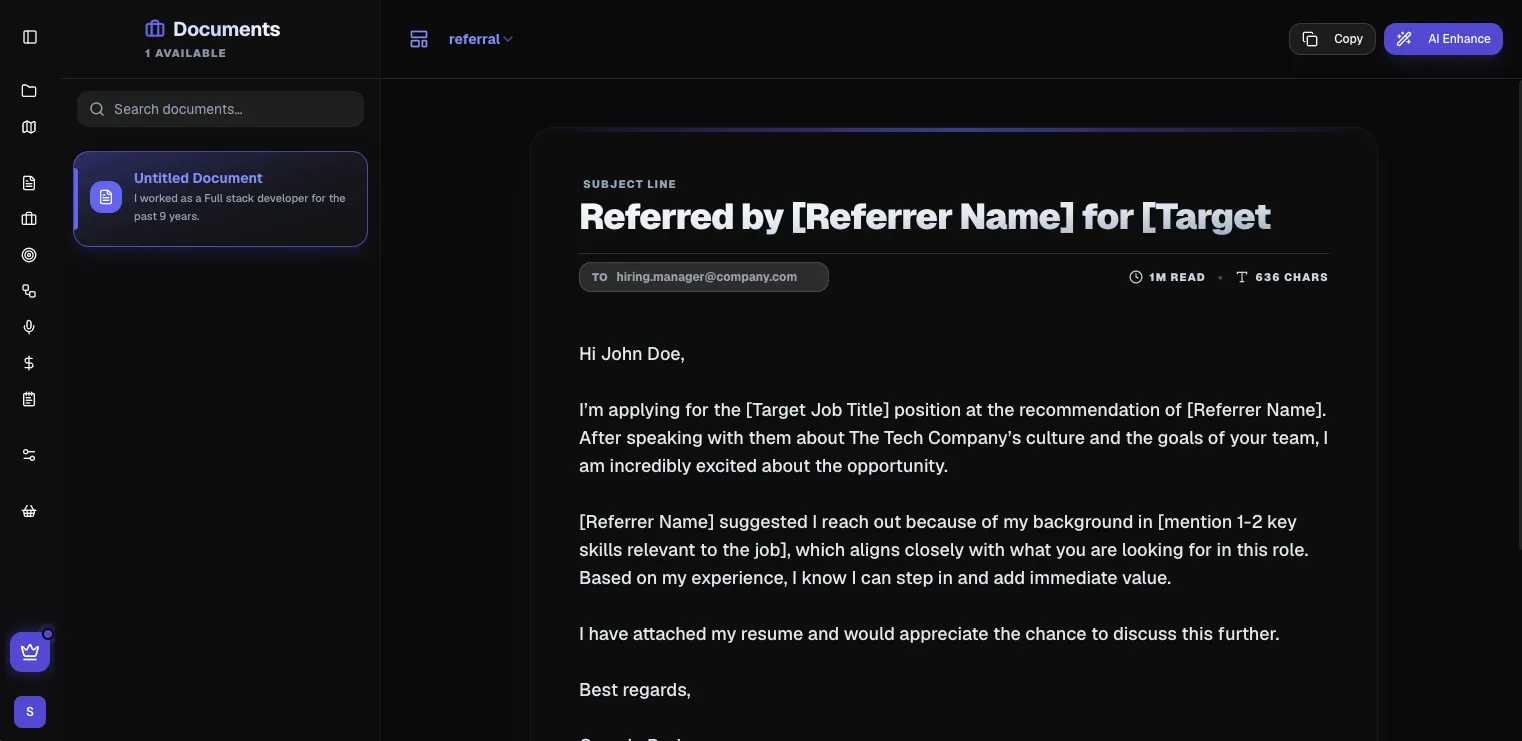
Choose the Right Email Style
Lyrra includes several email styles built for common job search situations: standard, concise, referral, follow-up, and networking. Each style adjusts the tone, structure, and length of the draft to suit the purpose. A follow-up email reads differently from a cold networking message, and the style selector accounts for that rather than giving you one generic format for every situation.
You can switch styles, compare the draft, and adjust the wording directly in the editor before using the final version.
Edit, Copy, and Improve With AI
Every generated email remains fully editable. You can change the recipient field, subject line, and message body, then copy the final text when it is ready. Paid users can also use AI enhancement to improve the email body while keeping the final message under their control.
Writing stats such as estimated reading time and character count help keep the email focused. A long email is not always a better email, and the stats make it easier to catch when a message has drifted beyond what a recruiter is likely to read in full.
Built for Practical Outreach
The email generator is designed for volume without loss of quality. When you are reaching out to multiple companies, following up on multiple applications, and maintaining multiple networking conversations at once, the ability to generate a strong first draft quickly, tied to your actual documents, is a meaningful time-saving.
It is not a tool for automating outreach entirely. It is a tool for removing the blank page problem so you can spend your time on the parts that actually require your judgement: the specific detail, the honest framing, the reason this message is worth reading.